
Clot your data leaks.
Your Social Security number in a tax question. Your address in an email to the landlord. A password in a Discord chat. Clotr notices before you hit send and lets you hide it. It all happens on your computer.
Free and open source, and still early. Works in Chrome, Brave, Edge and Firefox on a computer.
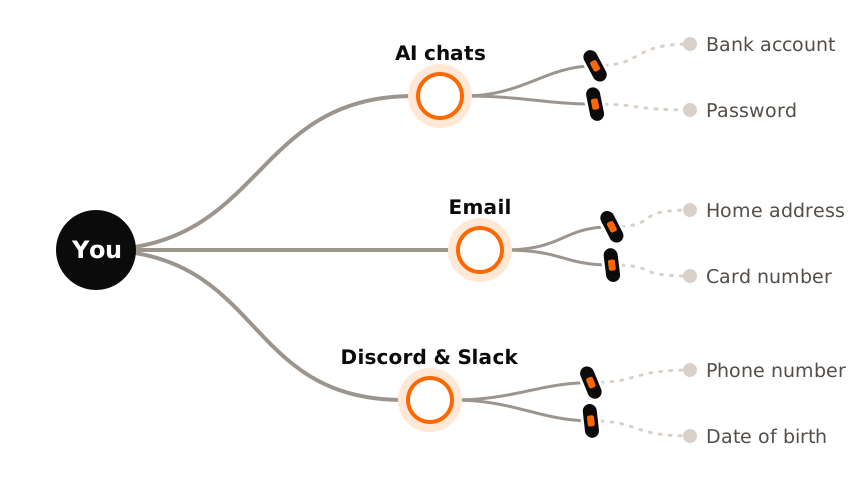
Wherever you type something private
People ask AI for help with everything now, and write to each other all day across social media and work chats. Private details slip into both. Clotr's goal is a "suit of armor around the world" for all devices, but today starts with the browser extension. Here's what Clotr catches in ordinary moments like these.
At home
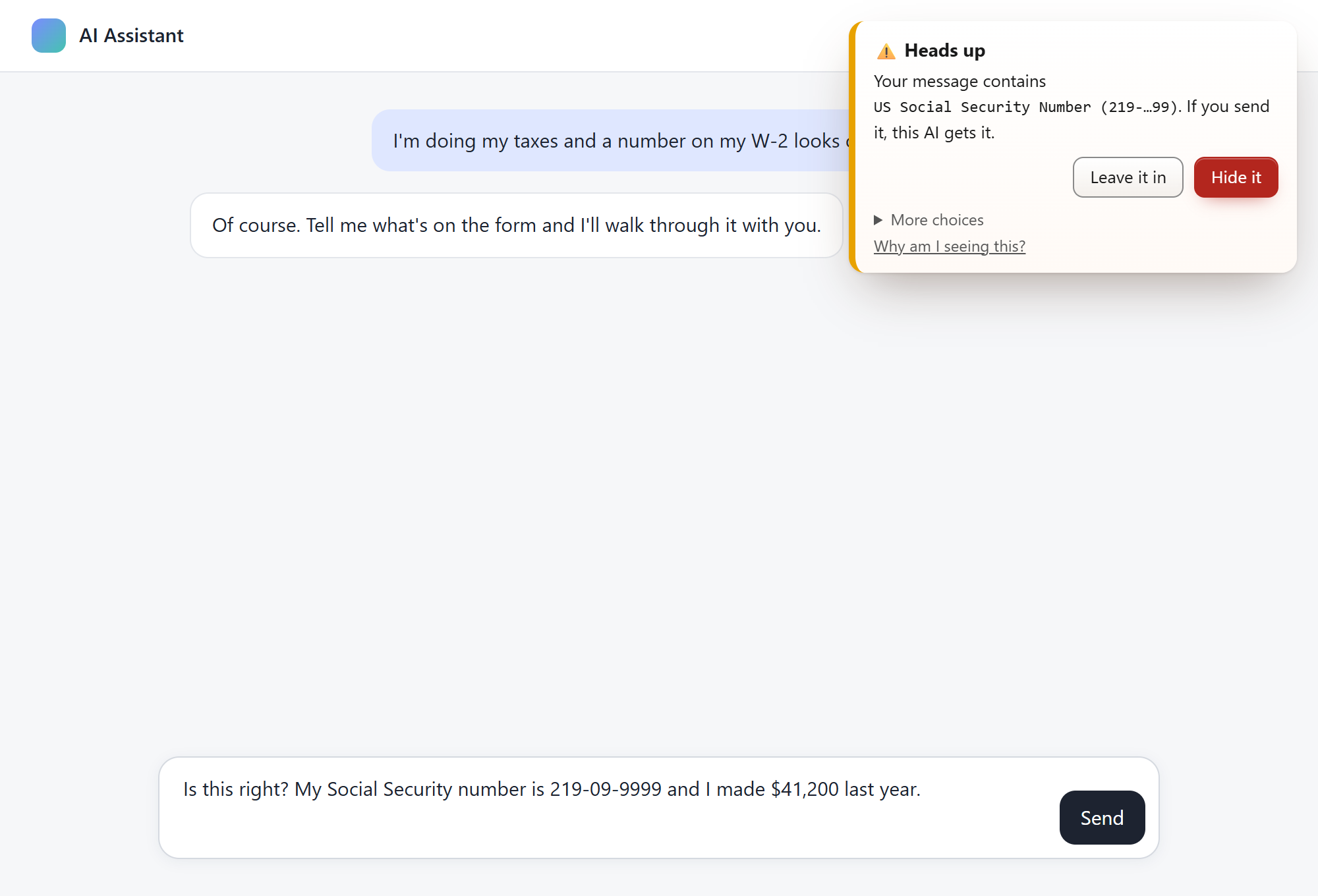
Is this right? My Social Security number is 219-09-9999 and I made $41,200 last year.
Clotr caught a Social Security number
The heater is broken again. I'm at Oak Street, Apt 4B. Call me at 937-555-0123 when you get this.
Clotr caught a phone number
The bank is on the phone asking for the code they texted me: 482913. Should I read it to them?
Clotr caught a sign-in code, the thing scammers ask for
Everyday use
Find me some great pizza places in Chicago, somewhere near 123 Ashland Avenue.
Clotr caught a home address
just log in as me lol, the password is Sunflower2009
Clotr caught a password
omg my birthday is March 14, 2013!! party at 18 Birch Lane on saturday, everyone come
Clotr caught a date of birth and a home address
At work
Please charge the card on file, 4111 1111 1111 1111, for the March invoice.
Clotr caught a card number
Summarize for the chart: patient MRN 00482913, DOB 02/11/1961, chest pain since Monday.
Clotr caught a medical record number and a date of birth
deploy still fails, here is the key I used: AKIA4HPQ7XZ2R6TWLJ3N
Clotr caught a cloud access key
- Built in
- ChatGPT Gemini Microsoft Copilot Claude Meta AI Perplexity Character.AI DeepSeek Grok and 9 more AI chats
- One click in Settings
- Gmail Outlook Yahoo Mail Discord Slack WhatsApp Messenger Microsoft Teams, or any site you're on. Planned: built in like the AI chats, so there's nothing to switch on.
The numbers above are made up. On email and chat apps, Clotr warns and hides the same way, but it never reads other people's messages.
What happens when you type something private
- You type or paste like you always do: in an AI chat, an email, or a message on Discord or Slack.
- If there's a password, a key or something personal in there, Clotr catches it. Even when it's written out, like "nine three seven…". Nothing leaves your computer to do this.
- A little note pops up in the corner and tells you what it found. Hide it, or leave it in and send anyway. It's your call. Clotr only stops a message if you've told it to.
What it catches
- Passwords and keys
- Passwords, however you word them, and keys for OpenAI, GitHub, AWS, Stripe and a lot more.
- Personal stuff
- Phone numbers, emails, home addresses and birthdays. In digits, in words, or a mix.
- ID and money numbers
- Card numbers, bank accounts, Social Security and Medicare numbers, medical record numbers and national IDs.
- What scammers ask for
- A code someone texted you, the security code on your card, a remote access code. If someone's asking for it, it's worth a second look.
- Your own list
- Add your name, your family, your address, where you work. Clotr keeps a scrambled fingerprint of each, never the words themselves.
- Files you attach
- Text files, PDFs, and Word, Excel and PowerPoint files you drop into a chat.
It all stays on your computer
- No servers, no analytics. Clotr doesn't send anything anywhere. There's a test that checks that every single time the code changes.
- It never saves what you typed. Just what kind of thing it found, on which site, when, and what you did about it. You can look at all of it and delete it whenever you want.
- It only runs where you say. Out of the box, only on AI chats. On your email or a chat app only once you switch it on, one site at a time, and your browser asks you first. Never on every website at once.
Check it yourself
- See what it keeps. Clotr's own page What Clotr stores shows every record it keeps, and what your browser allows it to reach: nothing outside the browser.
-
Watch it stay quiet. Open
chrome://extensions, switch on Developer mode, and under Clotr click service worker. Its Network tab stays empty while you use it. - Read the tests. A rule check fails every build that adds code able to send data anywhere.
-
Rebuild it. Every release can be rebuilt from the code, byte for byte: its checksum
matches the release's
SHA256SUMS.txt.
See what you've already shared
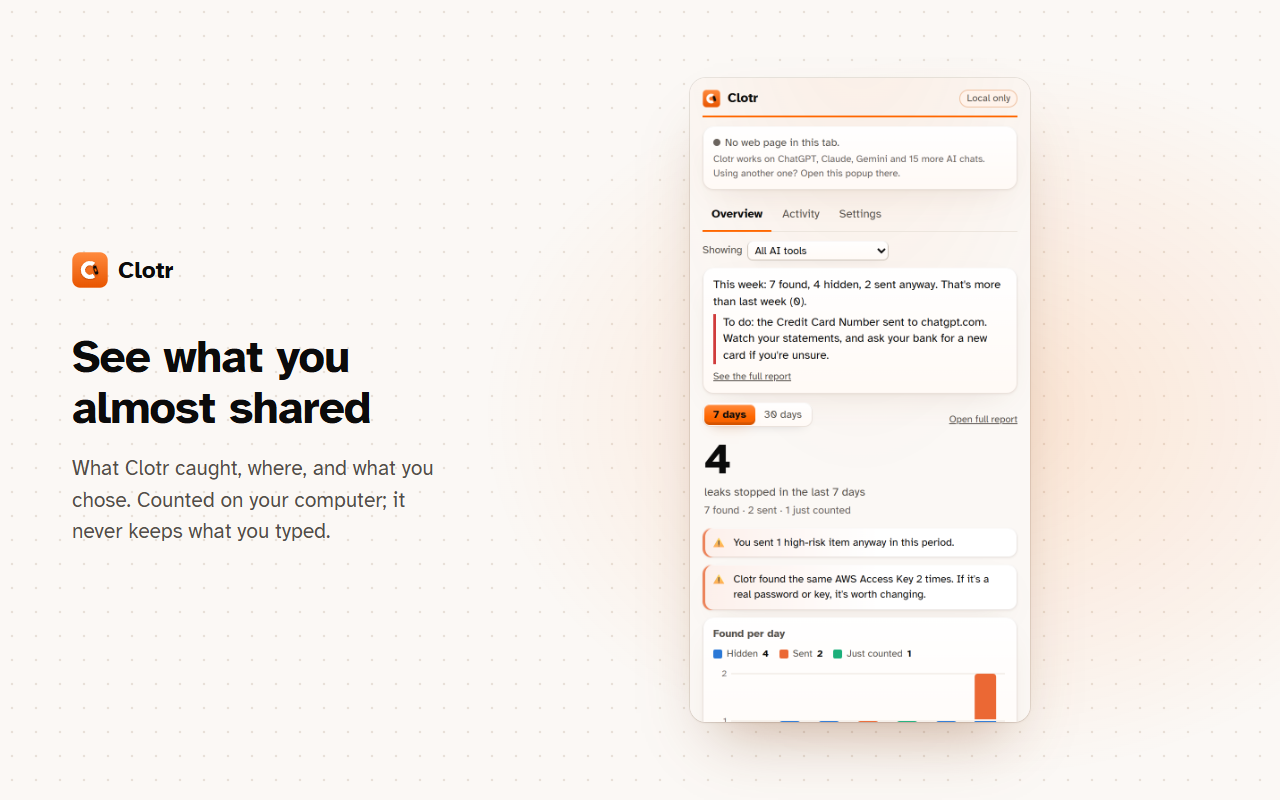
Click Clotr's button to see what it caught this week and where. The full report draws a mind map of what each site already knows about you, what Clotr stopped, and where it can't see, plus what you can do about it now.
Install
Clotr is headed to the Chrome Web Store. For now, here's how to install the early version:
-
Grab the latest
clotr-<version>.zipfrom Releases and unzip it. - Open
chrome://extensions(orbrave://extensions) and switch on Developer mode. - Click Load unpacked and pick the folder you unzipped.
- Pin Clotr to your toolbar. A welcome page opens with a practice box so you can try it out. For your email or chat apps too, open Clotr's Settings and switch them on.
Setting it up for a parent or a friend? Print the one-page guide to leave next to their computer. Libraries and senior centers are welcome to hand it out.
Works in Chrome, Brave and Microsoft Edge on Windows, Mac and Linux. There's a Firefox version too. On phones, only Firefox for Android can run extensions.
How it's made
No AI inside, no network, no accounts, open code, free for people.
- Clotr has absolutely NO AI. My basic software engineering education has taught me that our most reliable results come from deterministic calculations. While there is AI implementation in the creation and maintenance of Clotr (I'm just one guy, but honestly I want to provide the best protection I can while continuously learning), there's absolutely no AI within or around Clotr. I've used Claude Code to help teach me best practices, project management, coding practices, and so much more. NO AI will ever be used within Clotr; it defeats the point. I use AI to combat AI, but I want to isolate it as much as possible. If you have any questions, please reach out to me on GitHub or with the Report a problem button.
- Deterministic patterns. Clotr spots private stuff with plain pattern matching that anyone can read. It doesn't talk to any AI service.
- Free, and it stays free. Use it, change it, share it. It's under the GNU Affero General Public License.
- Tested every time. Detection tests, privacy tests and real browser tests run on every change, and every release can be rebuilt byte for byte.
For organizations, and supporting Clotr
Clotr is free at work too. An office can roll it out to every computer through browser policy, with ready-made presets for developers, for offices that handle client names, and for clinics, plus a printable page that shows the policy is applied. Nothing is ever reported to the organization: everyone's Clotr is the same free one. Planned for teams that want more: a small-team pack with a one-page use policy, a checklist for cyber-insurance renewals, install guides and email support, at $299 a year for up to 25 people ($999 up to 100; $1,499 for IT providers), free for schools, libraries and nonprofits.
People never pay for Clotr. It's funded by grants and by organizations that buy the pack, never by ads or data. Roll it out to a team · Ask about the pack or a commercial license
Who's making this
I'm Alex, a computer science student. I started Clotr because AI chats make it effortless to share things that should stay private, and the people most likely to do it (parents and grandparents, kids, anyone who trusts the friendly box on the screen) are the least likely to know where their words end up.
It started with me. I was using AI so naturally that I stopped filtering what I said. My curiosity takes me down wild rabbit holes, and I began to notice how much the AI was noticing about me. When it brought up things I'd only been thinking about, the implications frightened me.
I started this project in 2025, after finishing my Google IT Professional certificate, and grew it during my freshman year at university. I'm using it to learn how real software gets made and shipped, security and privacy, Git, and how to work well with AI tools. I organize the project and lay its foundations, and an AI coding assistant writes much of the code with me. That's the point for me, but there's no AI in Clotr itself: nothing from this project runs AI on your computer.
Clotr will always be free for people. It runs only on your computer, never sends anything anywhere, and its code is open, so you don't have to take my word for it. Every release has to pass hundreds of automated checks before it ships. I build it with my own time and money, so if Clotr misses something, or warns you about nothing, please tell me: every report makes it better for the next person. The more you use Clotr, the more you report bugs, the better it gets. For free.
Alex (BilliamBaSH)